Describe an AI app. Test it. Publish it to your team.
Business teams describe, test and publish AI apps in the browser, in minutes instead of weeks. Teammates request access from your marketplace, Okta-style, and every run executes inside your environment.
- Free plan: 3 apps, 100 runs a month
- Marketplace with access requests
- Credentials stay on your workers
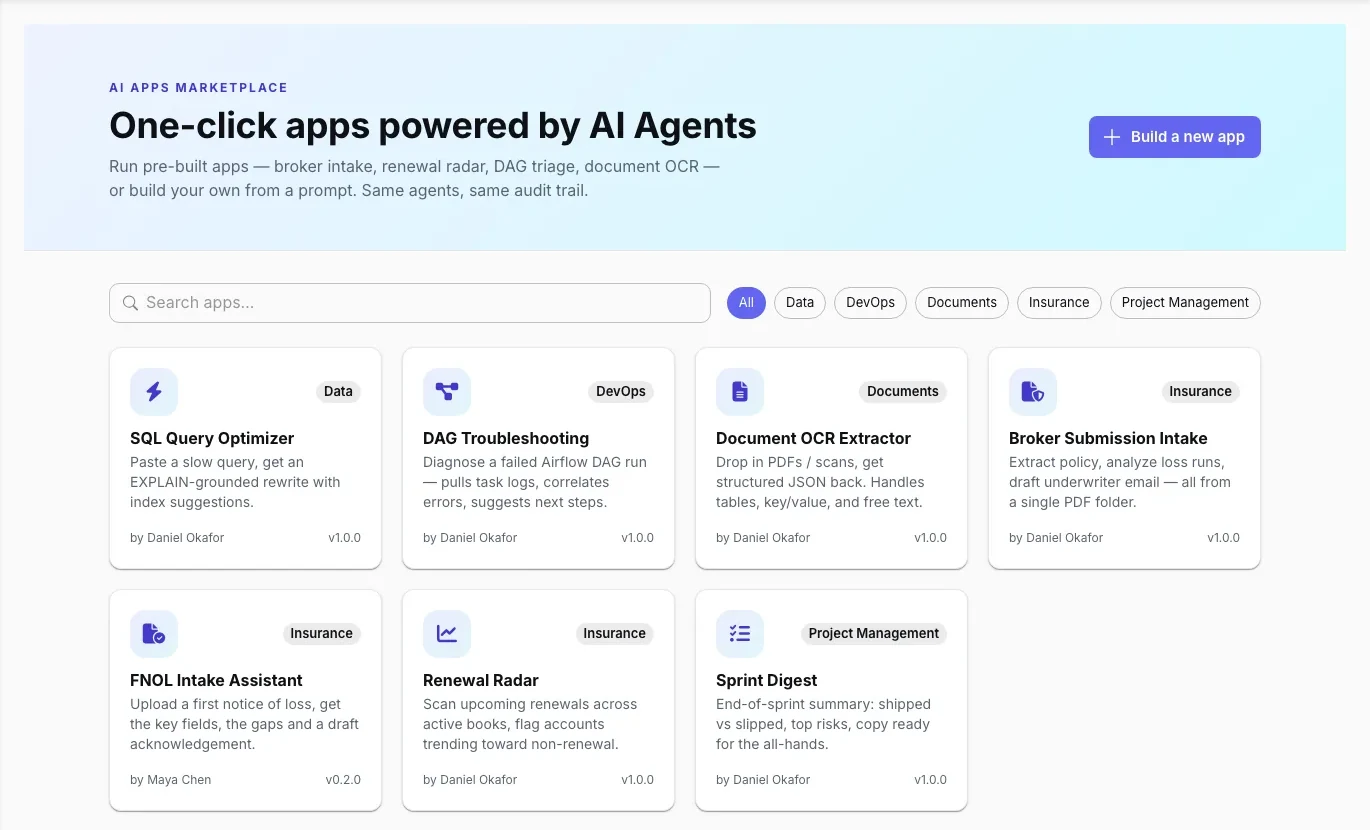
The gap Studio closes
An AI app demo works for the person who built it. Getting it into everyone else's hands usually takes a sprint of engineering effort nobody budgeted for.
Demo, engineering ticket, eventually shipped
- Someone shows a working prompt in a 1:1: "this could save the team hours."
- File a ticket. Wait for engineering capacity.
- An engineer writes a wrapper script.
- Add auth: who can run this, and how do they sign in?
- Security review of the new endpoint.
- Package and deploy to internal infrastructure.
- Ops sets up monitoring and audit logging.
- An admin provisions access by hand for the first five users.
- The author re-explains what it does to every new user.
Demo, publish, marketplace, access, run
- A business user opens Studio's prompt-to-app builder.
- They describe the app in plain English and Studio generates the bundle.
- They adjust the inputs and outputs visually if needed, and run a test.
- They click Publish; an admin gets a review notification.
- The admin approves and the app appears in the team's marketplace.
- Teammates discover it and click Request access; an admin approves, Okta-style.
- Audit log and governance apply automatically, with no extra wiring.
- The author moves on to the next idea instead of writing docs.
Business users build apps. Not engineers.
The in-browser builder takes a plain-English description and produces a working bundle: form fields, agent workflow, output panels and the wiring. No code, no packaging, no deploy pipeline.
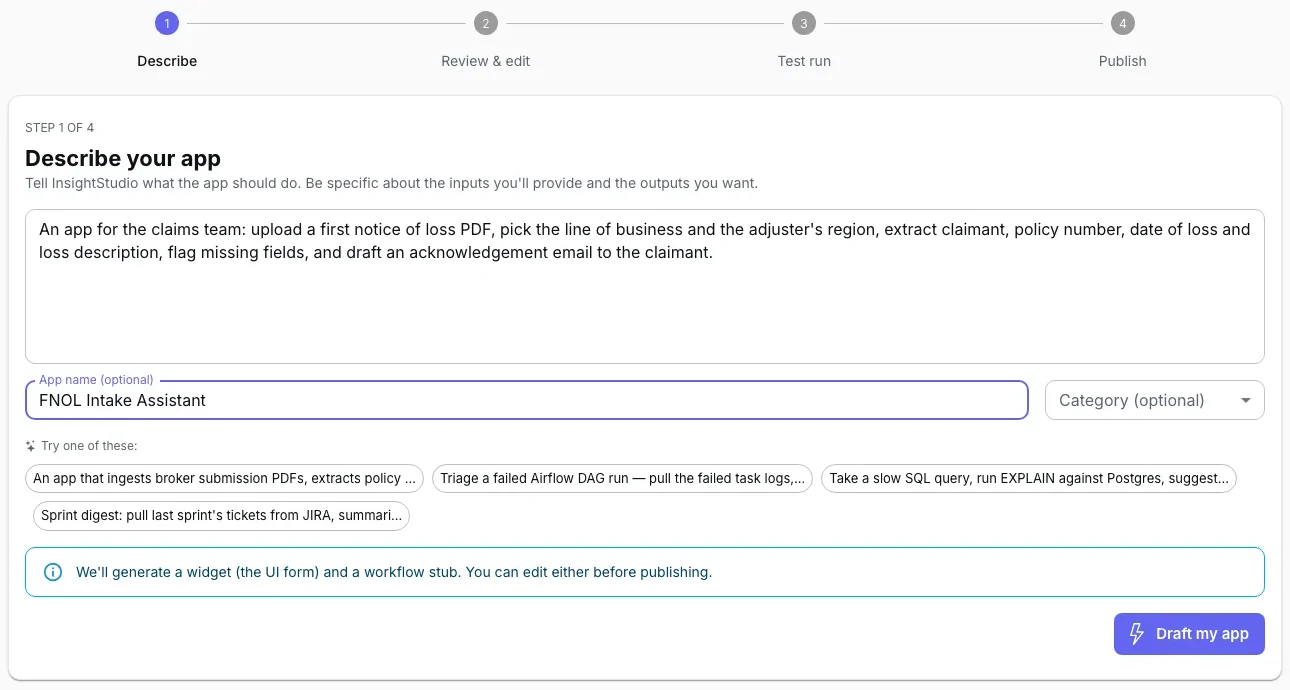
Start from a sentence, not a ticket
Type what the app should do. Studio sends the description to the model your deployment is configured with and writes a complete draft in one pass.
- A full bundle: the form and output panels, the workflow steps and their prompts, the app metadata and a playbook the agent follows.
- Your model: drafting uses AWS Bedrock or the Anthropic API, whichever is configured.
- Works without a model too: a template generator produces a valid, generic draft and tells you it did.
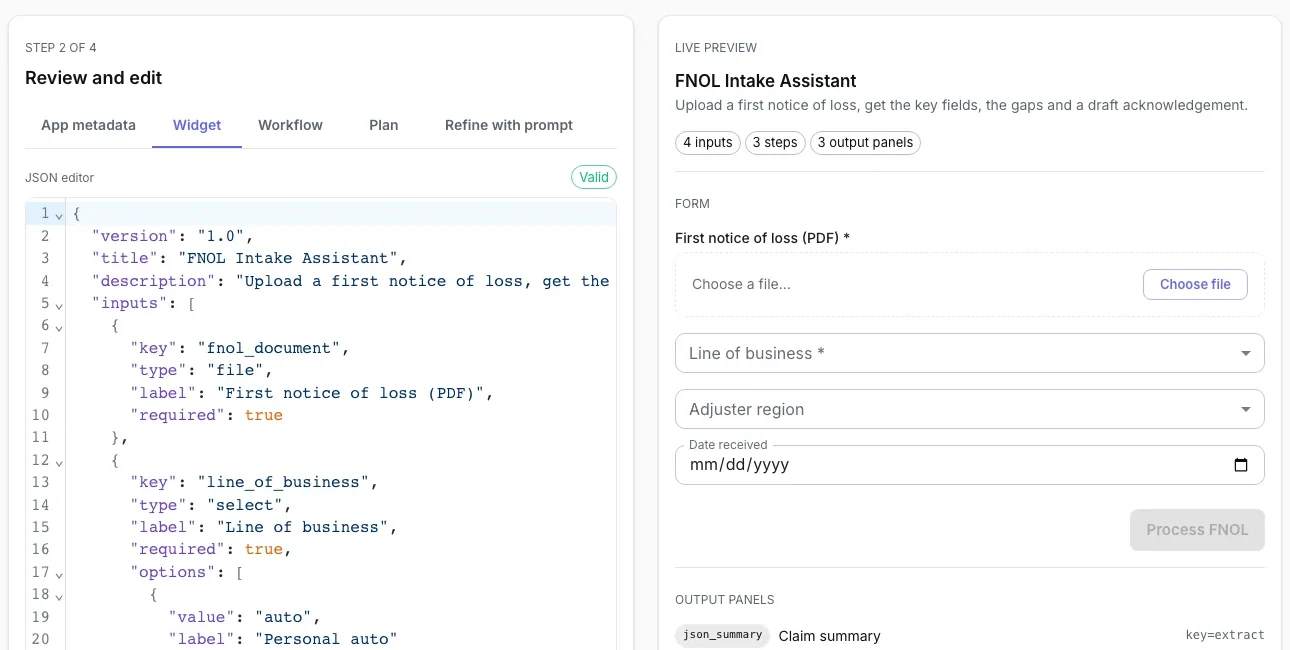
See the form change as you edit it
The draft opens in an editor with a live preview beside it. Nothing is hidden: the app is four small files you can read.
- Visual widget editor: drag-and-drop form fields and output panels, with the rendered form next to the JSON.
- Workflow and plan: the steps in YAML and the playbook in Markdown, including when the agent should stop and ask a person.
- Refine with a prompt: ask for a change in words and Studio rewrites the draft (this needs a model).
- The no-code path covers about 80% of cases; power users can still drop into YAML.
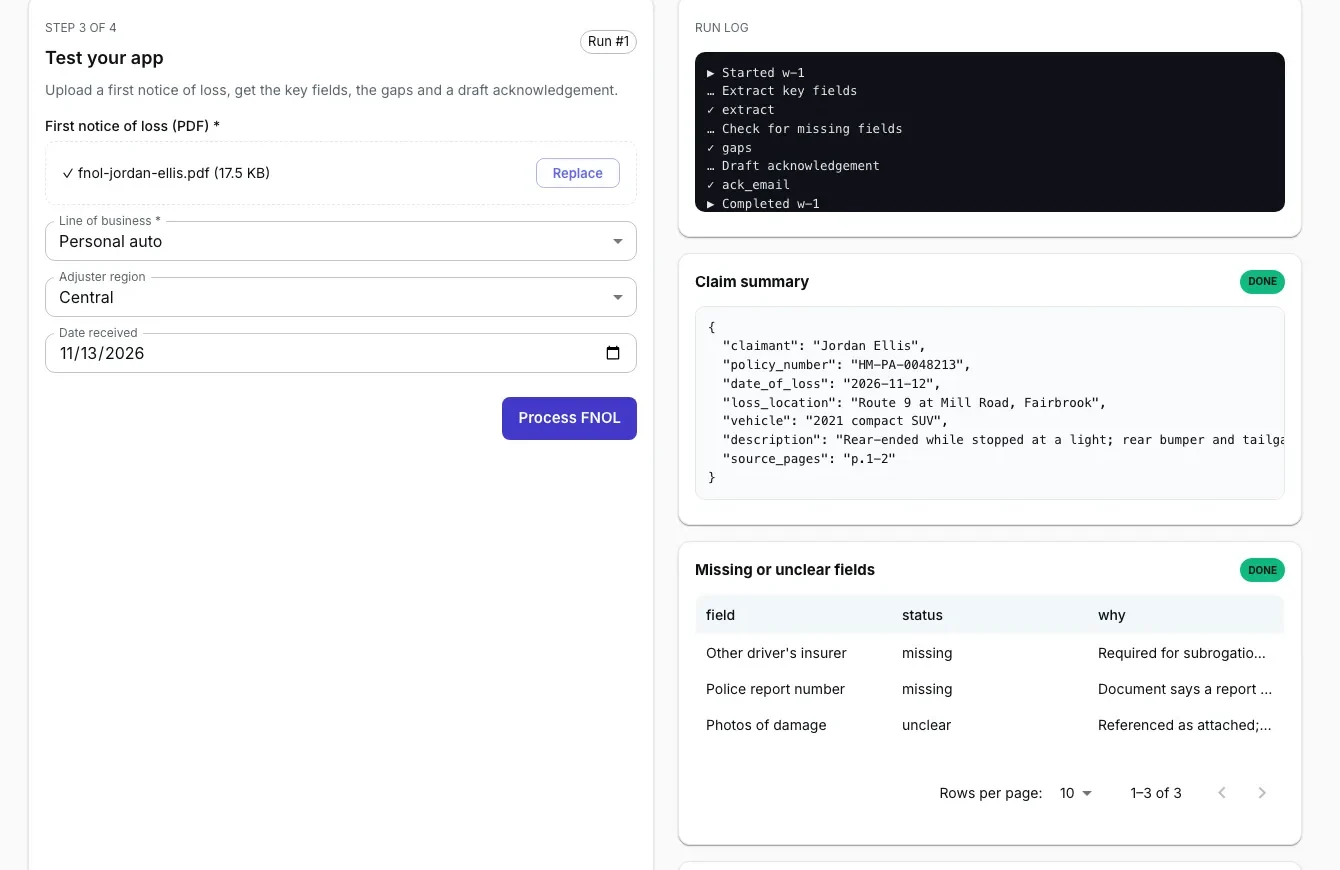
Try it on a real input before anyone else sees it
Upload the file, pick the options and run. The run log streams each step and every output panel fills in as its step completes.
- Real results need a worker: a connected InsightWorker agent executes the steps with its own model and tools.
- Check the layout first: before a worker is connected, a built-in stub walks the steps and fills each panel with sample data.
- Drafts stay private: only the owner, people with an edit grant and administrators can open one.
Every publish is a new, immutable version
Studio checks the bundle before it can go live, then publishes it with a version number and release notes.
- Version history: who published each version, when, and the files that went with it.
- Version and rollback: one click rolls back to any earlier version, and the history stays complete.
- Every run records its version, so a result can be traced to the form and prompts that produced it.
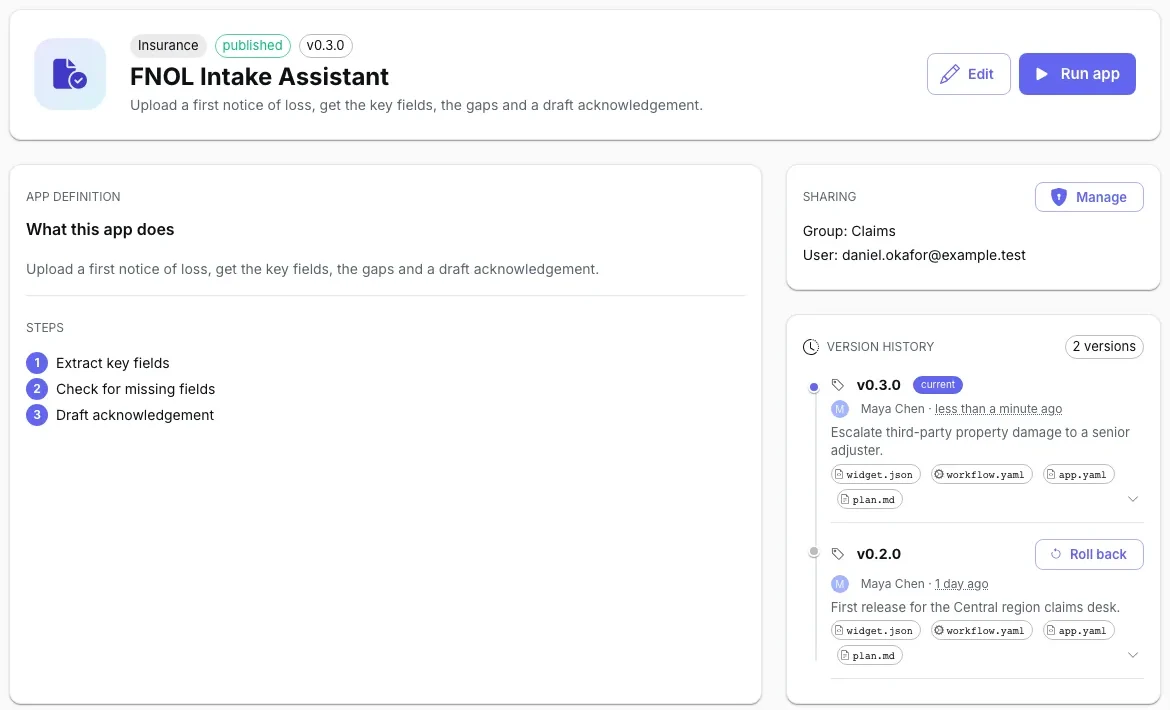
About the screenshots. Every screen on this site is the real product running with made-up data: a fictional insurer, Harborline Mutual, with invented people and example.test addresses. The run outputs shown were posted by a scripted test worker.
Discover. Request. Run. Like Okta for AI apps.
Every published app shows up in your team's marketplace. People browse the catalog, see what is available and request access themselves. Admins approve or deny with one click: no tickets, no direct messages asking to be added.
Discover
Browse the marketplace by team or tag. Search, filter by team, sort by recency.
Request
A one-click access request goes to the admin.
Approve
The admin grants or denies, with an audit trail. Different approvers per app, to mirror your org.
Run
Open the app, fill in the form and watch live results.
Group-based grants. A grant such as "Claims team can run X" applies automatically to new members, so nobody provisions access per user when someone joins or moves teams. Every access grant and every run is captured in the audit log.
Grants: three principals, three levels
Share an app with a group, a single person or everyone in the organisation, at run, edit or admin level. The app's owner or a Studio administrator adds and removes grants from the app's detail page.
- Group-based grants apply automatically to new members of the team.
- Publishing and rolling back stay with the owner and Studio administrators.
- Grants belong to the app, so a new version keeps them.
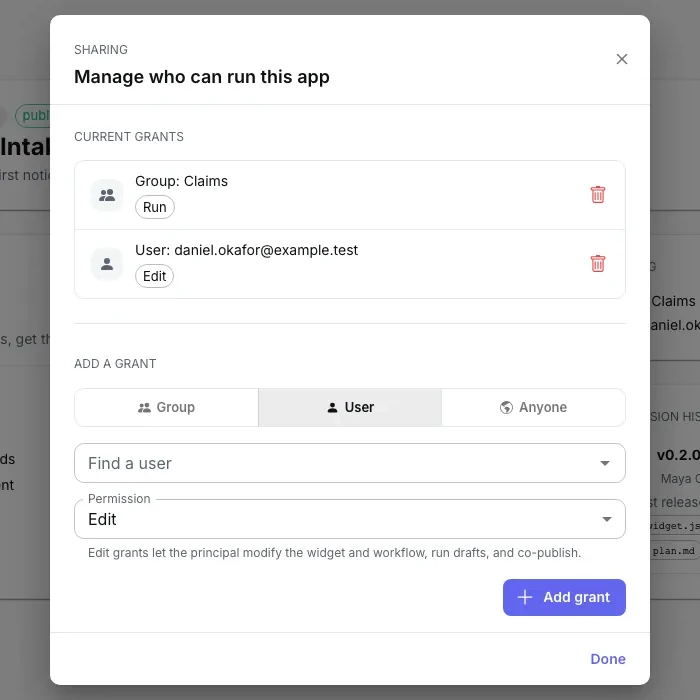
Groups, sign-in and audit
Define groups in Studio and, if you use Okta, link them and pull the tenant's groups with Sync from Okta. Membership is not stored in Studio: a group grant matches the group names carried on a person's sign-in token against Studio's group slugs, so check that your tokens carry them before you rely on a group grant.
- Sign-in with email and password, or OIDC single sign-on on the paid plan.
- Users, roles, identity providers and API keys in one admin page.
- An audit log of sign-ins and administrative changes.
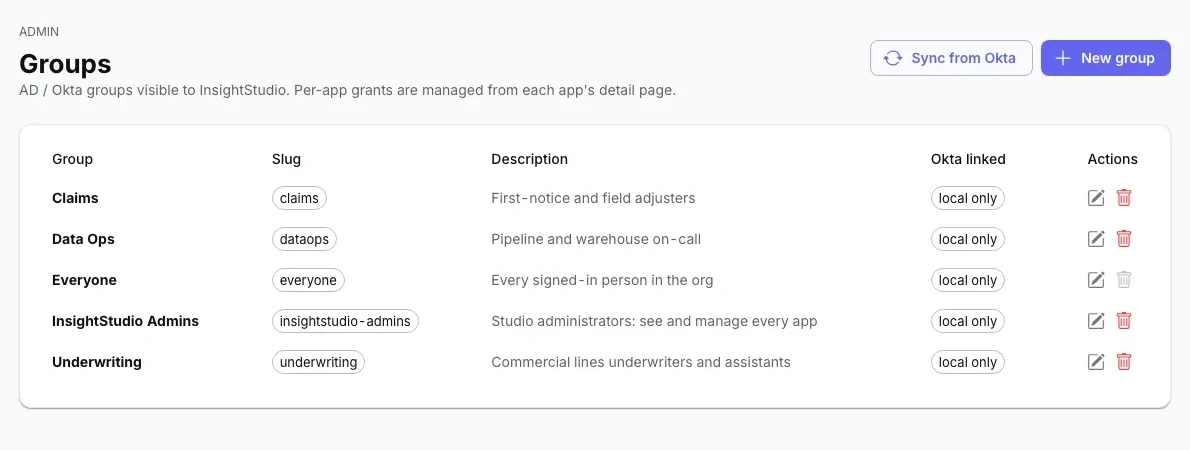
Runs execute on InsightWorker, inside your network
Studio queues a run; it does not execute it. InsightWorker agents on machines you control poll Studio over outbound HTTPS, claim the run, execute the steps and post each event back. Studio stores the events and streams them to the browser.
- Nothing reaches into your network. Workers call Studio; Studio never calls them.
- Credentials stay on the worker: SharePoint, a database or a model provider are configured on the box, not in Studio.
- Two paths to the marketplace: the browser builder, or the InsightWorker CLI with
iw app publish. Both produce identical bundles, surface in the same marketplace and honour the same governance. - Worker boxes (laptops, VMs, on-prem servers) run
insightworker --workerto join your Studio fleet.
Built for every role in the loop
Each role gets the surface it needs and never has to use the others.
Business builder
Describes the app, iterates visually and publishes. No code skills required: the person who knows the problem builds the solution.
Teammate / runner
Opens the marketplace, requests access if needed, fills in a form and sees results. No install, no setup, no .env.
Admin / approver
Reviews new apps before they surface, approves access requests, manages groups and per-app grants, and pulls audit reports.
IT / DevOps
Helm or docker-compose install. Wires SSO, S3, the database and model endpoints, and scales the worker fleet with standard ops tooling.
Start free. Upgrade by talking to us.
Self-serve sign-up creates a workspace on the free plan with you as its administrator. No payment details are asked for.
Build and run a few apps
For one team trying InsightStudio on a real problem.
- Up to 3 apps
- Up to 100 runs a month; the count resets on the first of the month
- The deployment's default model
- Sign-in with email and password; no single sign-on
No app or run limits
For organisations rolling Studio out across teams.
- Unlimited apps and runs
- Any model your deployment is configured for
- OIDC single sign-on with your identity provider
- Limits can be set per organisation
How upgrading works. When a workspace reaches a limit, Studio says which one and offers a Contact us request; we move the workspace to the paid plan by hand. The numbers above are the product's defaults and can be changed for a self-hosted deployment.
Speed without giving up control
Most low-code internal tool platforms fast-track creation and ignore governance, which is why they stall in enterprise procurement. Studio does both.
SSO and RBAC
Okta, Azure AD, Google Workspace. Group sync. Per-app grants by user, team or org role. Group-based grants apply automatically to new members.
App approval workflow
No app surfaces in the marketplace without a designated reviewer's sign-off. Use different reviewers per team if you want.
Full audit log
Every run, every step, every tool call: who built it, who ran it, which model, how many tokens. SIEM webhook export. Evidence for your own SOC 2, GDPR and HIPAA reviews.
Model governance
Provider lockdown, region pinning and per-org token quotas. Disable tools by name. Capability-matched worker routing.
Your data, your network
Studio runs in your VPC, with S3 in your account and Postgres in your database cluster. No telemetry, no data egress.
Versioned, with rollback
Every published app version is immutable. Roll back to any earlier version with one click. The audit log records which version ran each time.
Compliance. InsightStudio runs in your environment and keeps audit logs your auditors can use as evidence for SOC 2, GDPR and HIPAA reviews.
Guardrails, evaluation and governance
Know every agent, put policy on every model call, and screen what goes in and what comes out. All of it is built into Studio, and each part stays off or observe-only until an admin switches it on.
One register of agents
Every Studio app, version, run and worker in one register, with owner, model, spend and last run. Findings flag an agent with no owner, a model outside the allow-list, no risk tier or no recent runs. A sync never overwrites a change a person made.
Read-only discovery
Connectors list the agents a team has built in AWS Bedrock Agents, Azure AI Foundry, Salesforce Agentforce and Microsoft Copilot Studio. Credentials are secret references, and any write is refused.
Policy on every model call
Both of the builder's model providers go through one gateway. It applies model allow-lists, spend limits by day, week or month and per-call cost caps, in enforce or monitor mode, and every decision is audited.
Guardrails
The platform guard covers PII detection and redaction, prompt-injection checks, a grounding check that drops figures not in the source, and topic and toxicity policies. Every decision is a span on the InsightLense trace.
Release gates and evaluation
A policy can require approvals and an evaluation result before a version is promoted. Evaluation replays the agents against the Accept, Reject and Ask answers people already gave, and reports agreement and regressions.
Linked to traces and prompts
Register entries link to the run's trace and cost in InsightLense and to the prompt version in InsightPrompts, wherever those IDs exist.
Defaults. The gateway is off until an administrator turns it on, so every call is allowed and nothing is written. With it on and no policy, every call is allowed and audited. The guard is off by default and can be set to observe or enforce. Discovery connectors are read-only.
Bring one app idea and we will build it with you
Tell us the form your team fills in today and the answer it waits for. We will draft, test and publish it in a working session.